AI Logo Maker, AI Design: Hexa
- 4.4
- Rating
- 1.00M
- Installs
- Free
- Price

 Analysis by App-foxy
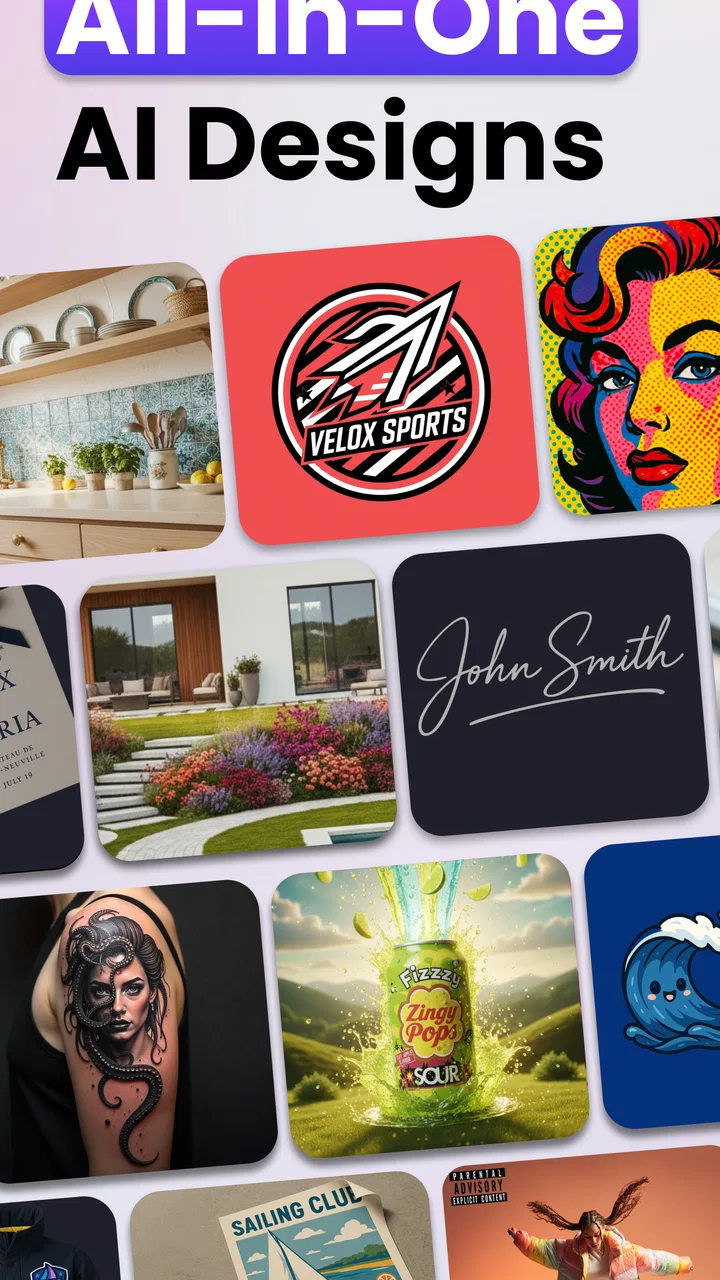
I found AI Logo Maker, AI Design: Hexa most interesting when I treated it as a quick creative workshop rather than a complete branding studio. It is an Art & Design app from Superapp Labs that brings logo creation, product-image work, album-cover ideas, and signature design into one mobile space. The central appeal is speed: instead of beginning with a blank canvas, I can start from an AI-assisted concept and then decide whether the result is useful enough to refine.
That convenience also makes connectivity an important part of the experience. The app’s main value comes from generating and transforming visual ideas, so the moments that depend on processing are the moments where a weak connection can interrupt the flow. I would recommend it to someone who wants a fast starting point for a small project, social profile, personal brand, or experiment. I would be more cautious about recommending it as the only tool for a polished identity system that needs exact control over every detail.
How the creative workflow feels on a phone
My first impression is that Hexa is aimed at reducing the intimidation of design. Traditional design software often asks me to understand layers, grids, typography, export settings, and image editing before I can make anything attractive. This app takes the opposite route: I describe or select a direction, review generated possibilities, and use the most promising one as a starting point.
You May Also Like

 Blood Strike: 2.5 Anniversary
Blood Strike’s Loadouts Turn Every Drop Into a Tactical Gamble
A close look at Blood Strike’s custom loadouts: how fast access to signature weapons reshapes its battle royale rhythm, rewards preparation, and narrows the gap between fights.

 Pandora - Music & Podcasts
Pandora’s Music Is Easy to Start, but Harder to Recover
Pandora’s strength is its low-effort path from a seed to a station. Its weak spot is how much confidence it asks you to place in connection, setup, and quiet recovery.

 8 Ball Pool
 Is Built on Rivalries, Rematches, and Routine
A close look at the rivalries, rematches, shared routines, and unanswered safety questions that turn a quick pool match into a persistent mobile community.

 Samsung Music
’s Quiet Strength Is Playing What You Already Own
Its reach comes less from spectacle than from dependable access to a personal library. That simplicity is both the app’s strongest retention engine and its ceiling.

 AccuWeather: Weather Radar
AccuWeather Review: A Quick, Clear Forecast for Everyday Decisions
For everyday plans, the best forecast is the one you can understand quickly. AccuWeather makes rain timing, radar, and local conditions easy to act on, with a few trade-offs.

 Hill Climb Racing
Why Hill Climb Racing Still Turns Crashes Into One More Run
A tiny car, a bumpy hill and one more upgrade: Hill Climb Racing keeps resurfacing because its simple chaos makes every near-miss feel personal.
More From Our News Desk



That is particularly helpful on a phone. A mobile screen is not ideal for precise drawing or complex layout work, but it is excellent for collecting ideas while I am away from a desk. I can think about a logo while planning a small online shop, testing a podcast identity, or preparing an album-cover concept, then compare visual directions without opening a desktop editor.
The app is free to install and is suitable for Everyone, which makes it approachable for casual users and younger creators. It also includes in-app purchases ranging from $2.99 to $39.99 per item. That pricing detail matters because the free entry point invites experimentation, while serious or repeated use may lead me toward paid choices. I would explore the workflow first rather than assuming that every useful output is included without cost.
Superapp Labs has positioned the app around several related jobs instead of one narrow logo task. I can use it for a business mark, a product presentation, an album-cover direction, or a signature-style graphic. The advantage is convenience: I do not need to switch between several specialized apps just to explore a few visual concepts. The trade-off is depth. A focused logo editor may offer more exact control, while a dedicated photo editor may be stronger for detailed retouching.
Where an internet connection changes the experience
The most important practical point is that the app should be approached as a connected creative tool. AI generation is the part of the workflow most likely to require communication with a remote service, so I would avoid starting an important design session in a place where the signal is unreliable. On a stable connection, the process feels naturally exploratory: I can request an idea, inspect it, reject it, and try a different direction.
On a weak network, the problem is not just waiting. Creative momentum is fragile. If I have already decided that a particular style is right for a café logo or a product image, an interrupted generation can make me lose the thought that led to it. My practical habit would be to prepare the brief before tapping the generation control. I would write down the subject, mood, colors, and intended use first, so a retry does not require reconstructing the idea from memory.
A useful distinction is between browsing and production. Browsing means generating several rough options simply to discover a direction. Production means preparing the version I actually intend to use. I am comfortable doing the first activity on mobile data when the connection is dependable, but I would reserve the second for a stronger network. This reduces the chance of spending a paid action, losing a promising variation, or ending with an incomplete result at the moment I need it.
Connectivity also affects whether the app feels spontaneous. A quick logo experiment during a commute sounds appealing, but a moving train, crowded venue, or basement room can make an AI workflow unpredictable. I would use those moments for planning prompts and collecting references, then generate when the connection becomes steady. That small change makes the app feel less frustrating without pretending that every mobile situation is equally suitable.
Real mobile scenarios where Hexa makes sense
Imagine I am helping a friend launch a small handmade-products page. We do not yet know whether the identity should feel playful, refined, natural, or bold. Instead of spending an evening building four rough versions from scratch, I can use Hexa to explore those directions on a phone. We can compare the results side by side, notice which shapes and colors feel appropriate, and then take the strongest concept into a more precise editor if necessary.
Another realistic use is an album-cover session. I may have a title, a mood, and a rough visual theme, but no finished artwork. The app can help me move from a vague idea to several possible visual starting points. I would not treat the first attractive image as a final cover automatically. I would check whether the title remains readable, whether the central subject has enough space, and whether the design still works when reduced to a small thumbnail.
Product imagery is another area where the app can save time during early planning. If I am preparing a small product listing, I can explore how the item might look in a cleaner visual setting before arranging a full photo session. The important limitation is that an AI-generated concept should not replace an accurate product representation when customers need to see the real item. I see this feature as useful for presentation ideas and promotional direction, not as permission to make a product look materially different from what buyers will receive.
Signature creation is more personal. I could use the app to explore a stylized mark for artwork, social posts, or a personal project. Here, the best result may not be the most elaborate one. A signature that is too decorative can become difficult to reproduce or recognize. I would test the design at small sizes and against both light and dark backgrounds before deciding that it works.
What to do when generation fails or a result misses the point
AI design tools rarely understand a vague request exactly as I imagine it. If the first result is wrong, I would not keep pressing the same command with tiny wording changes. I would identify the specific failure: perhaps the symbol is too literal, the mood is too childish, the composition is too crowded, or the lettering is not suitable for a logo. Then I would rewrite the brief around that problem.
A stronger workflow is to change one major variable at a time. I might keep the subject and alter the style, then keep the style and alter the color direction. This makes it easier to understand what is influencing the output. It also prevents a common mistake: adding so many instructions that the request becomes contradictory and the result becomes visually confused.
If a generation stalls, I would first check the connection rather than immediately assuming the app has lost the project. I would wait briefly, avoid repeatedly tapping the same control, and reopen the relevant screen only if the interface clearly stops responding. Repeated taps can create uncertainty about whether a request was submitted once or several times. That matters more when an action may be connected to an in-app purchase.
I would also save or export a promising result as soon as the app gives me a version worth keeping. This is not glamorous advice, but it is one of the most useful habits in any mobile creative workflow. A design session can involve many experiments, and the best option may be an earlier variation rather than the last one. Keeping a small set of candidates makes recovery easier if the connection drops or I decide to continue in another app.
The app is not the right recovery tool for every kind of problem. If I need exact vector geometry, carefully controlled letter spacing, a reusable brand system, or a large set of coordinated templates, I would move to a dedicated design application. Hexa is stronger at opening possibilities than at replacing a full professional production pipeline. Knowing that boundary prevents disappointment.
Using it carefully on mobile data
Because the creative process can involve repeated generation attempts, I would be conscious of where and how I use it. I would avoid starting an open-ended experiment on a limited mobile plan, especially if I am likely to request many variations. A better approach is to define a small creative test: choose two or three visual directions, generate only enough options to compare them, and stop once one direction clearly wins.
This also improves the quality of the work. Unlimited experimentation can produce a pile of attractive but unrelated images. A short brief keeps the session focused. Before generating, I would decide what the design must communicate, where it will appear, and what visual elements should be avoided. For a logo, that might mean prioritizing recognizability at small size. For an album cover, it might mean leaving room for readable text. For a product image, it might mean keeping the item visually central.
I would not assume that a result is ready simply because it looks polished on a phone screen. Mobile previews can hide small flaws in edges, lettering, contrast, or spacing. I would inspect the design at a larger size when possible and view it in the context where it will actually appear. A logo that looks impressive full-screen may become an indistinct mark in a profile circle. A signature that looks elegant on white may disappear over a photograph.
There is also a privacy-minded reason to keep prompts general when the project is still experimental. I would avoid placing unnecessary personal details, confidential business information, or unreleased campaign instructions into a creative prompt. The app is most comfortable for me when I use it to develop visual direction rather than treating it as a private archive for sensitive material. That is a sensible habit for any connected AI service.
How it compares with familiar design alternatives
Compared with starting in a blank-canvas editor, Hexa gives me a faster first step. Blank canvases reward people who already know what they want, but they can slow down anyone who is still searching for a visual identity. Hexa is better for discovery because it turns a general idea into something I can react to. I can say what feels wrong about an image more easily than I can describe a finished design from nothing.
Compared with a template-based logo maker, the AI approach feels less predictable. Templates offer consistency and often make alignment easier, but they can also produce identities that look familiar because many users begin from the same structures. Hexa is more useful when I want unusual starting points or a visual direction that does not fit a standard category. The cost of that freedom is that I may need to correct more details myself.
Compared with a professional desktop suite, this app wins on accessibility and speed, not on exhaustive control. I would choose it for brainstorming, quick personal projects, and early-stage client discussions where the goal is to show possibilities. I would choose a more advanced tool for final vector cleanup, exact brand guidelines, complex typography, or a production file that must be edited repeatedly by a team.
The same comparison applies to product visuals and album covers. Hexa can help me form a concept quickly, while a dedicated photo or layout application is usually better for precise finishing. The strongest workflow is not necessarily choosing one tool forever. I can use Hexa to get unstuck, then move the chosen direction into software designed for the final technical requirements.
Who will benefit, and who should look elsewhere
I think the app suits beginners, small creators, musicians testing cover ideas, independent sellers planning promotional visuals, and anyone who wants to explore a logo without learning a complicated design system first. It is also useful for people who think visually but struggle to turn a sentence into a concrete starting point. The ability to compare generated directions can make that first decision much easier.
I would be less enthusiastic for a professional designer who already has a disciplined workflow and needs complete control from the first sketch. That person may find the AI-first approach slower than working directly with vector shapes, grids, and established brand assets. I would also hesitate to use it as the sole solution for a business identity that must remain consistent across packaging, signage, web layouts, and formal brand documentation.
The app has attracted a substantial audience, with an average rating of 4.5 from around 80 thousand ratings and more than a million installs. Those figures suggest that the quick, approachable format resonates with many people, although popularity does not remove the need to inspect each result carefully. Its current version is 2.6.9, and it runs on Android 7.1 or later, which makes it accessible across a broad range of compatible devices.
I would also keep the purchase model in mind. Starting free is convenient, but repeated creative work can make paid items more relevant than they first appear. Before committing to a project, I would check which part of the workflow I can complete comfortably without paying and whether the available purchase matches the way I plan to use the app. That is especially important for someone who needs many variations rather than one occasional design.
My connectivity verdict after using the workflow
Hexa works best when I accept that it is a connected idea generator carried in my pocket. A reliable network lets me move quickly from a rough thought to several visual directions, while an unstable connection can interrupt the exact part of the process that makes the app appealing. I would not judge it by whether it replaces every desktop design tool. I would judge it by whether it helps me get from “I need something” to “I have a direction worth developing.”
For that purpose, I find it genuinely useful. I would prepare prompts before generating, keep mobile-data experiments focused, save strong candidates promptly, and inspect important designs outside the small phone preview. Those habits address the main friction points without taking away the app’s convenience.
My recommendation is therefore specific: try it if you want fast visual exploration for logos, product concepts, album covers, or signatures and you have a reasonably stable connection. Skip it as your primary tool if your work depends on exact vector editing, confidential material, or a carefully managed professional identity system. With that distinction in mind, the free entry point makes it easy to test, and the Art & Design focus feels practical rather than overwhelming. Its real strength is turning a blank idea into a workable visual conversation, not pretending that the first generated image is the finished answer.
FAQs for AI Logo Maker, AI Design: Hexa
01What is AI Logo Maker, AI Design: Hexa, and what can it do?
AI Logo Maker, AI Design: Hexa is an innovative application that leverages artificial intelligence to assist users in creating professional logos and designs effortlessly. It offers a wide array of templates, customizable options, and a user-friendly interface, making it ideal for entrepreneurs, designers, and anyone needing a visually captivating logo.
02Is AI Logo Maker, AI Design: Hexa suitable for beginners?
Absolutely! AI Logo Maker, AI Design: Hexa is designed with an intuitive interface that caters to users of all skill levels. Beginners will appreciate its straightforward navigation and guided design process, which simplifies the creation of logos without requiring prior design experience or skills. Advanced users can also enjoy its customization features.
03What customization features are available in AI Logo Maker, AI Design: Hexa?
The app offers extensive customization features including color palettes, font styles, and icon selections. Users can modify shapes, adjust layouts, and even incorporate their own images to create a unique and personalized logo. With AI-driven suggestions, the app helps streamline the design process while maintaining creative control.
04Does AI Logo Maker, AI Design: Hexa offer any collaborative features?
Yes, AI Logo Maker, AI Design: Hexa allows users to collaborate by sharing their designs with team members or clients directly from within the app. This feature facilitates real-time feedback and collaboration, ensuring that the final design aligns with the team’s vision and project requirements.
05Are there any costs associated with using AI Logo Maker, AI Design: Hexa?
AI Logo Maker, AI Design: Hexa offers both free and premium versions. The free version provides basic functionalities, while the premium version unlocks advanced features, premium templates, and additional customization options. Users can choose a subscription plan that best fits their needs and budget for enhanced design capabilities.
Pros
- User-friendly interface for quick logo creation.
- Wide range of templates for customization.
- AI-driven suggestions enhance creativity.
- High-resolution exports for professional use.
- Fast processing and minimal loading times.
Cons
- Limited free features; premium needed for full access.
- Some templates feel generic and overused.
- Occasional glitches on older devices.
- Limited editing tools for intricate designs.
- Requires internet for optimal performance.

AI Logo Maker, AI Design: Hexa
Gallery